Install TruthLayer
Get started in under 2 minutes. No account, no registration, no hidden costs. TruthLayer is open-source and available for all major Chromium browsers.
Jump to InstructionsCompatible Browsers
Google Chrome
Chrome 88+
✓ SupportedMicrosoft Edge
Edge 88+
✓ SupportedBrave
Brave 1.0+
✓ SupportedOpera
Opera 74+
✓ SupportedVivaldi
Vivaldi 3.0+
✓ SupportedFirefox
Coming Soon
○ In developmentSafari
Planned
○ On roadmapAll Chromium-based browsers (Chrome, Edge, Brave, Opera, Vivaldi) are fully supported. Firefox and Safari support are on the roadmap.
What It Looks Like
After installation, click the TruthLayer icon in your browser toolbar to analyze any website.
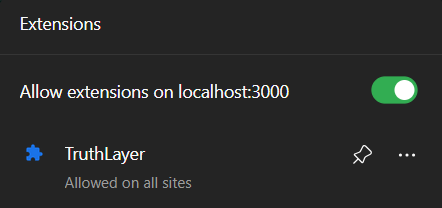
TruthLayer icon pinned in the Chrome toolbar — ready to analyze
Step-by-Step Instructions
Follow these 6 simple steps to start analyzing websites with TruthLayer.
Extract the ZIP
Extract the downloaded ZIP file to a folder on your computer (e.g., Desktop or Documents). Remember this location — you will need it in the next step.
Open Extensions Page
Type the following address into your browser and press Enter:
chrome://extensionsFor Edge, use edge://extensions • For Brave, use brave://extensions • For Opera, use opera://extensions
Enable Developer Mode
Toggle the "Developer mode" switch in the top-right corner of the Extensions page. This allows you to install unpacked extensions.
Load Unpacked Extension
Click the "Load unpacked" button and select the extension folder you extracted earlier.
Select this folder:
.../Truthlayer/extension/Pin & Analyze
Click the puzzle icon in your browser toolbar, find TruthLayer, and pin it. Then click the TruthLayer icon on any website to start analyzing.
Open Source
TruthLayer is fully open-source. Clone the repository, audit the code, contribute improvements, or report issues on GitHub.
Quick Questions
Can I install on multiple browsers?
Yes. Repeat the installation steps for each Chromium browser (Chrome, Edge, Brave, etc.). Your settings are stored independently per browser.
Will updates happen automatically?
Not yet. Since this is a developer preview loaded via "Load unpacked," you will need to pull the latest code from GitHub and reload the extension at chrome://extensions.
Do I need a backend server?
Yes. TruthLayer requires the backend server to run locally on your machine. After cloning the repo, open a terminal in the backend/ folder, run npm install && npm start, and keep it running while using the extension. The backend handles AI analysis and trust score calculation — it is not hosted remotely. This is a developer preview; a cloud-hosted version is planned.
Is my data safe?
Yes. TruthLayer only sends structured metadata (page title, headings, tracker domains) to the API. Raw page content stays in your browser. No personal data is collected or stored.